Get It Scrapped just announced their new...and first...Creative Team 2012-2013
I'm so excited to be part of this new group and thrilled to be among so many familiar faces!
Saturday, June 2, 2012
Tuesday, May 22, 2012
I Love a Makeover
It was a black and white makeover challenge for the AnnaGallery at Oscraps. I chose a very traditional page I did five years ago and gave it a fresh new look and a cleaner style with Anna's fabulous masks and artsy brushes.
the makeover

the original
the makeover

the original
Tuesday, May 8, 2012
AnnaPage Makeover
Layout Deconstructed by Eszter
AnnaTeamer, Eszter created this fabulous page, Shepherd, for the AnnaPage Makeover Challenge, a bi-monthly challenge from Anna Aspnes and the AnnaTeam at Oscraps. She shares her creative process here in this step-by-step tutorial on Anna's Blog.
Saturday, April 28, 2012
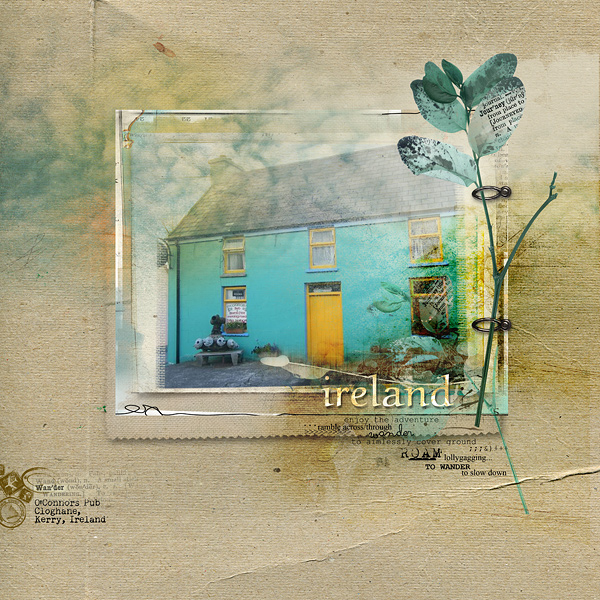
I Wish I Was There
A cousin of mine in Ireland recently sent me this photo. Aside from the fact that it's an Irish Pub and already a fun place to go, the colors are so wonderful and inviting! I love the contrast between the soft calming aqua blue and the sunny energizing yellow.
The colors of the photo were perfect for Anna Aspnes' new ArtPlay Palette Wander.
O'Connors Pub, Cloghane, Kerry Ireland
This page was created using digital products from Anna Aspnes. Anna's beautiful and artsy digital designs can be seen at Oscraps.
The colors of the photo were perfect for Anna Aspnes' new ArtPlay Palette Wander.
O'Connors Pub, Cloghane, Kerry Ireland
This page was created using digital products from Anna Aspnes. Anna's beautiful and artsy digital designs can be seen at Oscraps.
Monday, April 23, 2012
Earth Day Layout Tutorial
I'm a few days late for Earth Day which was Sunday, April 22 but everyday should be Earth Day!
This digital layout was created in Photoshop Elements 10 using Anna Aspnes’ new ArtPlay Palette Authentic and other supporting elements by Anna Aspnes Designs.
Building the Base
- Create a New Layout at 12 x 12 inches 300DPI. First we’re going to create a base and frame for the flower.
- Open SolidPaper2 in ArtPlay Palette Authentic and move onto the New Layout.
- Open ArtsyPaper3 in ArtPlay Palette Authentic and position on top of the first layer to add a little more texture to the frame. (I didn’t want too much texture in the center so I chose a soft brush at a medium opacity and carefully erased portions of the center.)
- To build the frame open three different frames (for variation and interest) from LacedFrames No. 1 and position in the center of the page. If necessary, you can adjust the size later to fit your flower.
Forming the Flower Stem
- To build the base of the flower open Transfer2.png in ArtPlay Palette Authentic and duplicate twice so you have three layers. Position each layer to create the flower’s base.
- Add PotPourrie PaperiePieces No.1 Image5.png and position on layer above to complete flower stem shape.
Creating the Leaves
- The leaf shape was easily created with the Tape in the Element’s Folder in the new ArtPlay Palette Authentic.
- Open the Tape element and duplicate twice so you have three layers. Position each layer either above or below a stem shape depending on what looks best to you.
Adding the Flower
- Open MultiMedia Flowers No.2 Image2.png and position on top of the stem.
- Open MultiMedia Leaves No.2 Image2A.png and position over stem base to add an artsy look.
Adding Depth and Interest to the
Leaves
- Open ScriptTease Happiness No.1 Image4A.png and duplicate four times so you have five layers to clip to each leaf layer. Position as desired.
Adding the Butterfly and Loop
- Open Artsy Flutterbys No.1 Image1Fill.png and position on page.
- Open Stitched LoopDaLoops White No.1 Image3PulledShad.png and position on layer below leaves.
- Open Sprinkles Image1D.png in MultiMedia Flowers No.2, position over flower and adjust to desired color.
Giving it Glow
- Open WarmGlows No.1 Image4.png duplicating three times. Position the Glow layers over the leaf layers. Adjust the Glows to color mode and experiment with opacity. The layers on this page vary from 70-85%.
Completing the Page
- Add the title ‘earth day’ positioning to the right of the flower. I used font 215OOOE. I added the year, but you can also add any other desired text.
- Add a new layer over the title layer stamping a brush and adjusting to color of your choice.
- Clip the color to the title.
- Open 12x12 Artist Edges No.6 Image5.png and position on page, reducing the layer to create the frame effect.
- Adjust saturation to white and duplicate layer to increase the frame’s depth.
Please
download the free Instructions
for Use eBooklet for further guidance on using Anna Aspnes
Designs.
Monday, March 26, 2012
Tutorial using ArtsyKardz in Digital Layouts
I recently wrote a tutorial for Anna Aspnes' blog using her new ArtsyKardz in psd format for digital layouts. These little gems can be used on their own to create cards or incorporated into your scrapbooking pages to create a mini page within the main page. The tutorial shows you how to load the ArtsyKardz file onto your main scrapbook page, clipping your photo to one of the ArtsyKardz layers.
ArtsyKardz tutorial for Delight in Music
Sunday, March 18, 2012
Recent Gallery Pages
Shine It's always great to have a wonderful photo to scrap! This is my son's girlfriend, Josie.
Delight in Music Love this fun photo of my granddaughter, Kaitlyn. The extraction was easy to create by simply erasing a portion of the frame.
Make a Wish Ava takes wish making very seriously
These pages were created using products from Anna Aspnes Designs. Anna's beautiful and artsy digital designs can be seen at Oscraps.
Delight in Music Love this fun photo of my granddaughter, Kaitlyn. The extraction was easy to create by simply erasing a portion of the frame.
Make a Wish Ava takes wish making very seriously
These pages were created using products from Anna Aspnes Designs. Anna's beautiful and artsy digital designs can be seen at Oscraps.
Subscribe to:
Posts (Atom)